
I keep having the same conversation with clients. A company spends weeks evaluating platforms to automate their workflows with AI, and then it hits executive review.
Security raises concerns. A senior leader mentions Microsoft's new AI features. Someone questions whether the recommended platform is "really necessary."
Decision paralysis.
I've had this conversation with at least a dozen companies in the last six months. The question always sounds the same: "Which platform should we use to build AI workflows?" But what they're really asking is: "How do I make a decision that won't get me fired if something goes wrong?"
Here's what I've learned after building these systems for mid-sized companies and PE portfolio companies, the choice between Retool, Power Automate, and a custom Azure solution isn't about which is "best." It's about matching the platform to your organization's technical depth, risk tolerance, and how deeply you're already committed to Microsoft's ecosystem.
Let me break down what each option actually delivers and where they break.
Key takeaways
Here's how these stack up, straight talk, no vendor bias:
- Retool: Best for teams with developer resources prioritizing speed ($15K-30K/year platform + build costs)
- Power Automate: Best for Microsoft 365 shops needing compliance breadth ($12K-24K/year licensing + build costs)
- Custom Azure: Best for complex requirements with committed engineering resources ($77K-389K year one, $27K-89K ongoing)
- Security: All platforms can be secured appropriately, focus on managing risk, not eliminating it
- Recommendation: Most companies benefit from a hybrid approach, using the right tool for each job
- Who This Article Is For: Mid-sized companies, PE portfolio companies, and enterprise teams evaluating low-code platforms for AI workflow automation.
📖 Table of Contents
Platform comparison at a glance
| Criteria | Retool | Power Automate | Custom Azure |
|---|---|---|---|
| Best For | Developer teams | Microsoft 365 shops | Complex custom needs |
| Development Speed | Fast (hours-weeks) | Moderate (3x slower) | Slow (3-9 months) |
| Year 1 Cost | $35K-80K | $27K-64K | $77K-389K |
| Ongoing Annual | $20K-45K | $17K-34K | $27K-89K |
| Technical Skills | JavaScript, SQL | Platform knowledge | Full dev team |
| Connectors | 70+ | 1,500+ | Unlimited (custom) |
| Compliance | SOC 2, HIPAA | 100+ certs (FedRAMP) | Full control |
Best For
- Retool
- Developer teams
- Power Automate
- Microsoft 365 shops
- Custom Azure
- Complex custom needs
Development Speed
- Retool
- Fast (hours-weeks)
- Power Automate
- Moderate (3x slower)
- Custom Azure
- Slow (3-9 months)
Year 1 Cost
- Retool
- $35K-80K
- Power Automate
- $27K-64K
- Custom Azure
- $77K-389K
Ongoing Annual
- Retool
- $20K-45K
- Power Automate
- $17K-34K
- Custom Azure
- $27K-89K
Technical Skills
- Retool
- JavaScript, SQL
- Power Automate
- Platform knowledge
- Custom Azure
- Full dev team
Connectors
- Retool
- 70+
- Power Automate
- 1,500+
- Custom Azure
- Unlimited (custom)
Compliance
- Retool
- SOC 2, HIPAA
- Power Automate
- 100+ certs (FedRAMP)
- Custom Azure
- Full control
Option 1: Retool
Retool is a low-code platform for building internal tools. You drag and drop UI components, wire them to your databases and APIs, and extend with JavaScript when you need custom logic. As of mid-2025, they've added AI Agents that can execute multi-step workflows where an LLM determines the control flow.
What it's good at:
Speed. A developer can build a production-grade internal tool in hours instead of weeks. The Salesforce connector is straightforward. You write SOQL queries, execute CRUD operations, and you're off to the races. If you have developer resources (in-house or retained), Retool delivers faster than anything else.
The 2023 breach everyone talks about:
Yes, Retool had a security incident. Here's what actually happened. Attackers ran a targeted phishing campaign against Retool employees using a deepfaked voice and Google Authenticator's cloud sync feature to compromise internal systems. They accessed 27 cloud customer accounts, all in the cryptocurrency industry. One company, Fortress Trust, lost approximately $15 million.
Here's the part nobody mentions: zero self-hosted customers were affected. If you deploy Retool in your own infrastructure, it operates in zero-trust mode with no connection to Retool's cloud.
The real downsides:
Vendor lock-in is severe. Your apps are stored as proprietary JSON with no code export. If you leave Retool, you rebuild everything from scratch. SSO is gated behind Enterprise pricing, forcing security-conscious organizations into expensive upgrades. And despite being "low-code," meaningful modifications require someone who can write JavaScript and SQL.
TCO:
For 10 builders and 50 end users, you're looking at roughly $15K-30K annually for platform licensing, plus $15K-40K for initial build, plus $5K-15K annual maintenance. Self-hosted adds $3K-10K in infrastructure costs.
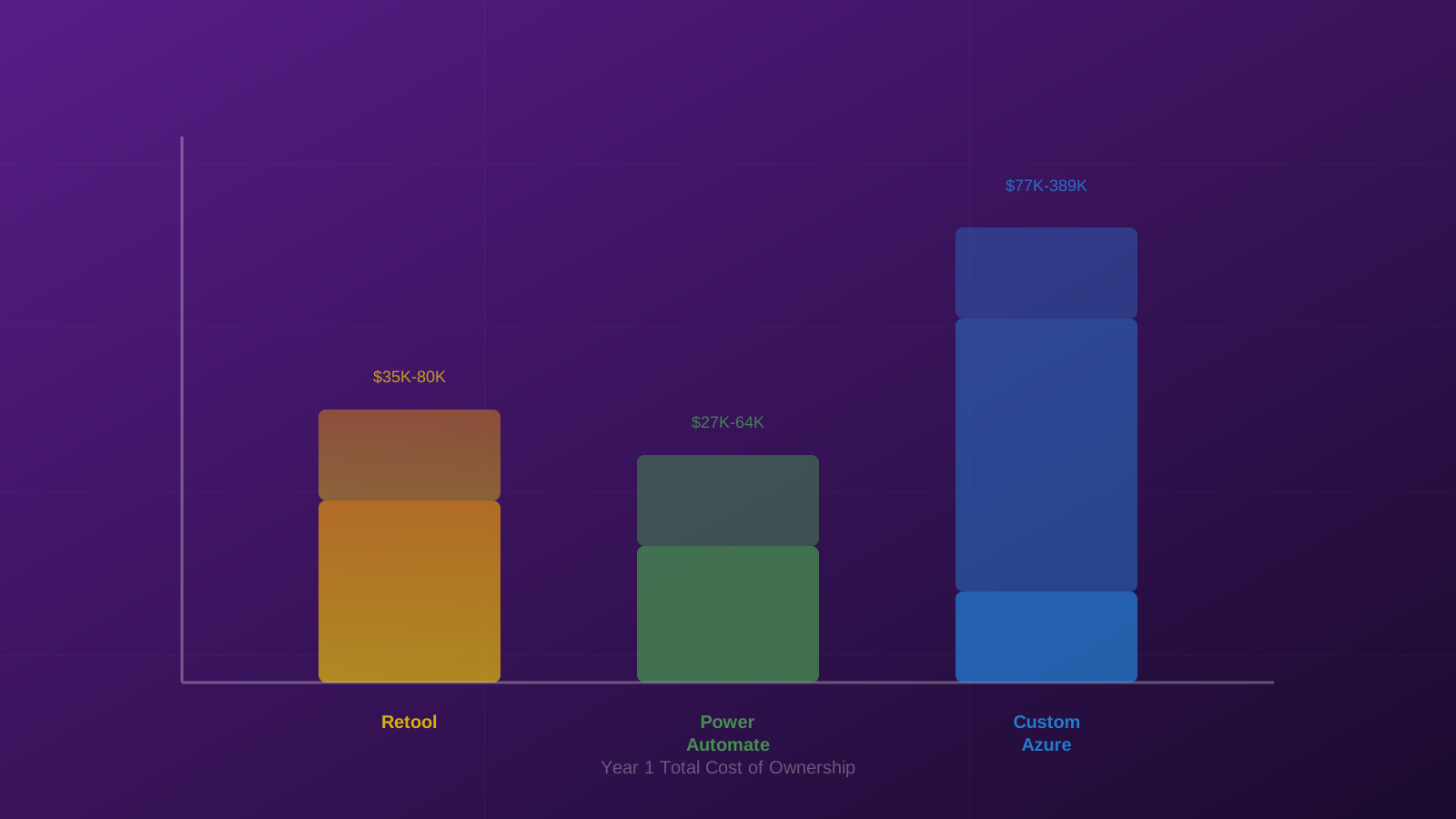
Understanding the total cost of ownership across platforms
AI IMPACT PRIORITIZER
Which AI use case should you tackle first?
Evaluate your AI ideas and get a prioritized ranking based on impact, effort, and feasibility.
Prioritize your use casesOption 2: Power Automate + Copilot
Power Automate is Microsoft's workflow automation platform. It connects to 1,500+ services (versus Retool's 70+), integrates with Copilot for natural-language flow creation, and comes bundled with Microsoft 365 for basic use cases.
What it's good at:
Compliance breadth and ecosystem integration. Microsoft carries 100+ certifications including financial services regulations (23 NYCRR Part 500, FedRAMP High, specific banking regulations). If you're already a Microsoft shop, the marginal cost is low and the compliance story is strong.
Where it breaks:
Development speed and capability ceiling. Simple flows like email notifications and approval routing are genuinely buildable by non-technical users. But anything complex requires expressions, custom code, and deep platform knowledge. The Salesforce connector has notable limitations: no multi-select picklist support, no custom domain sign-in for new connections, caps at 50 concurrent requests, and doesn't handle complex nested objects well.
Here's the reality: you can absolutely MacGyver things with Power Automate. But it'll take three times longer to build, it won't be as elegant, and you won't be able to scale it easily across your team. You'll get a duct tape solution that technically works but doesn't give you the velocity you need.
The sunset risk nobody wants to hear:
Microsoft has a pattern. SharePoint 2010 workflows were removed in 2020-2021. SharePoint 2013 workflows are being fully retired April 2, 2026. InfoPath was deprecated in 2014. Power Automate is the designated successor to all of these, and with 56 million monthly active users and 93% Fortune 500 adoption, it's not getting sunset anytime soon. But Microsoft will absolutely rename it, restructure licensing, and move features between tiers without warning.
TCO:
For the same team size, roughly $12K-24K annually for licensing (the Salesforce connector requires the Premium plan at $15/user/month), plus $10K-30K initial build, plus $5K-10K annual maintenance. Cheapest option if you're already paying for Microsoft 365.
Option 3: Custom Azure build
Building your own solution with Azure Functions, Azure OpenAI, and custom code gives you the highest ceiling for sophistication. You can architect multi-agent AI systems, fine-tuned models, complex orchestration, and real-time processing with complete control over every decision.
What it's good at:
Maximum flexibility and data control. You own the code. It's portable. Azure OpenAI provides contractual guarantees that customer data isn't used for training, prompts stay within your tenant, and you can request zero-data-retention. For organizations where regulatory risk outweighs development cost, this is the defensible choice.
The real cost:
Human capital, not infrastructure. The cloud bill might be $100-800/month. But you need $50K-300K for initial development (3-9 months with a dev team) and $25K-75K annually for maintenance. That maintenance number is a real person or significant contractor spend. Non-technical operations teams can't self-serve. Every change requires developers with Azure, Salesforce API, and AI/ML expertise.
TCO:
Year one is $77K-389K. Ongoing annual is $27K-89K. This only makes sense if you have committed engineering resources and requirements too complex for low-code platforms.

Custom Azure architecture offers maximum flexibility and control
The security reality check
Here's what often gets missed in these security discussions: the tools you're already using probably have similar risk profiles.
Power Automate isn't pristine. In 2025 alone, Microsoft disclosed CVE-2025-21187 (critical RCE vulnerability). Vectra AI research found that 71% of monitored Microsoft 365 accounts showed suspicious Power Automate activity, with the platform identified as a valuable lateral movement tool for attackers.
If you've approved Claude Code or similar AI tools that access local files, you've already accepted comparable risk to what Retool represents.
Security isn't about eliminating risk. It's about managing it appropriately. Self-hosted Retool, properly configured Power Automate with DLP policies, and custom Azure solutions can all be secured. The question is whether your team has the capability to implement those controls.

Security: Managing risk appropriately, not eliminating it
How to actually decide
Look, stop trying to find the "safest" option. Instead, answer three questions:
**⚡ Quick Answer:**
- Microsoft 365 shop? → Power Automate. - Have developers? → Retool. - Complex custom requirements? → Azure.
1. Do you live in Microsoft 365?:
If your company already runs on Microsoft 365, Dynamics 365, and you need the broadest compliance coverage, Power Automate is the pragmatic choice. Accept its limitations in development speed and Salesforce integration depth. Budget $15/user/month for Premium licensing and invest in training 2-3 internal power users.
2. Do you have developer resources?:
If you have developers (in-house or retained) and you prioritize speed of iteration, Retool delivers. Deploy self-hosted to neutralize security concerns and maintain full data isolation. Budget $15K-30K/year for platform licensing plus ongoing developer access. Understand that you're accepting significant vendor lock-in.
3. What's your regulatory ceiling?:
If you need maximum control, the highest compliance ceiling, or workflows too complex for low-code, the custom Azure path is justified. But only with committed engineering resources. Budget $100K+ for initial development and $30K-75K annually for maintenance. The infrastructure costs are trivially low. The real cost is human capital.
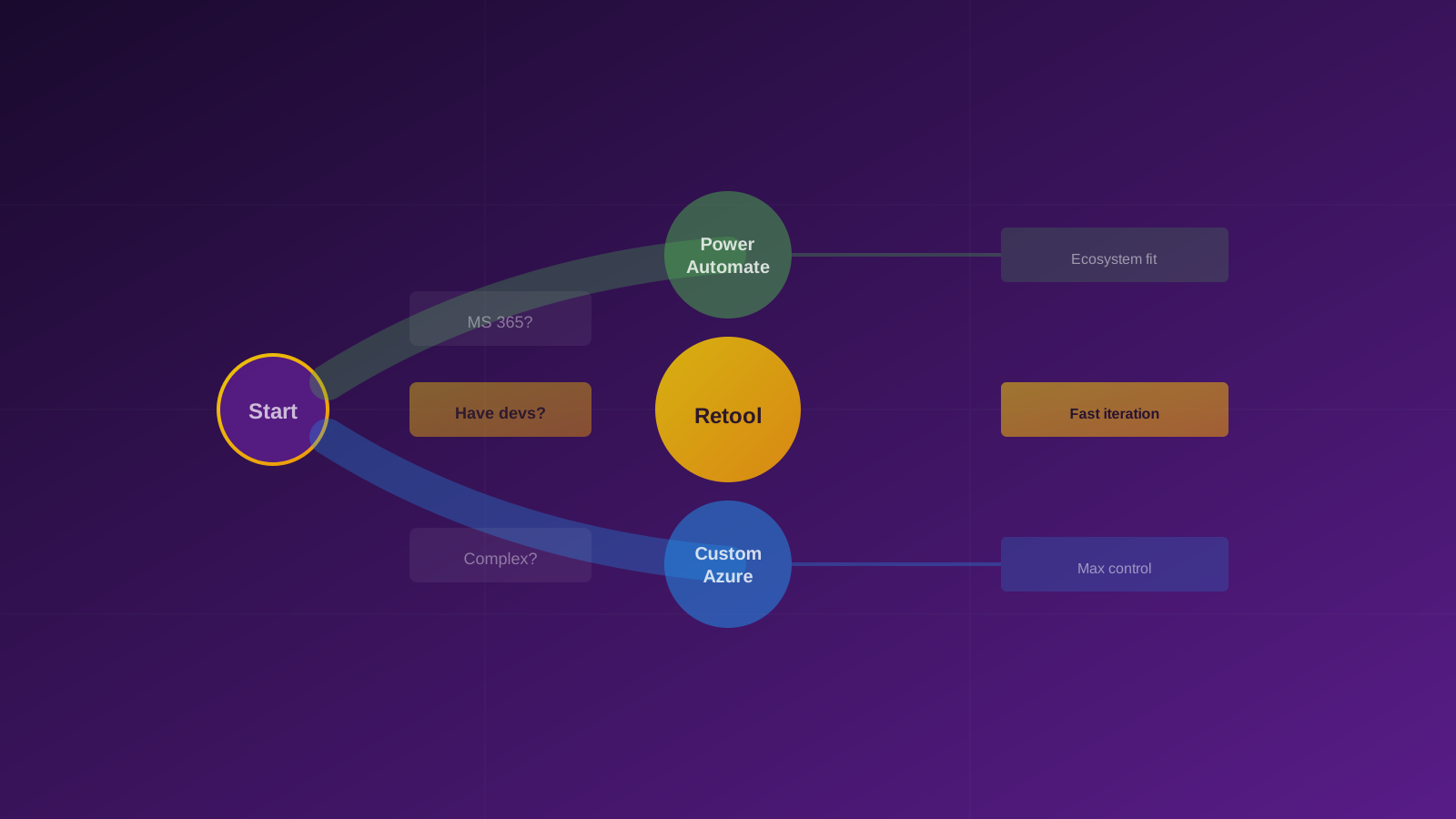
Three questions to guide your platform decision
The hybrid approach
For most mid-sized companies and PE portfolio companies, the right answer isn't picking one platform. It's using the right tool for each job.
Use Power Automate for standard workflow automation where Microsoft's ecosystem integration provides immediate value. Supplement with self-hosted Retool for custom internal tools and dashboards that require more UI sophistication. Reserve custom Azure development for the narrow set of use cases involving complex AI reasoning over sensitive data where neither low-code platform provides adequate control.
The companies that move fastest aren't the ones that spend months evaluating platforms to find the perfect choice. They're the ones that understand the trade-offs, pick a path that matches their capabilities, and start building.
Legal and compliance teams will always find reasons to say no. Your job is to help them understand that the risk of moving slowly often exceeds the risk of the platform choice itself.
Stop optimizing for "what if something goes wrong." Start optimizing for "how fast can we deliver value."